
Release notes
Tiza v0.1.0
Draw on top of code in your terminal to explain, debug and teach.
Open a source file in Tiza. Draw boxes, arrows, highlights, notes and marks on the code. Put the annotations into steps. Then show the steps live, or export them as images or video. AI agents can also draw, through a local API and an MCP server.
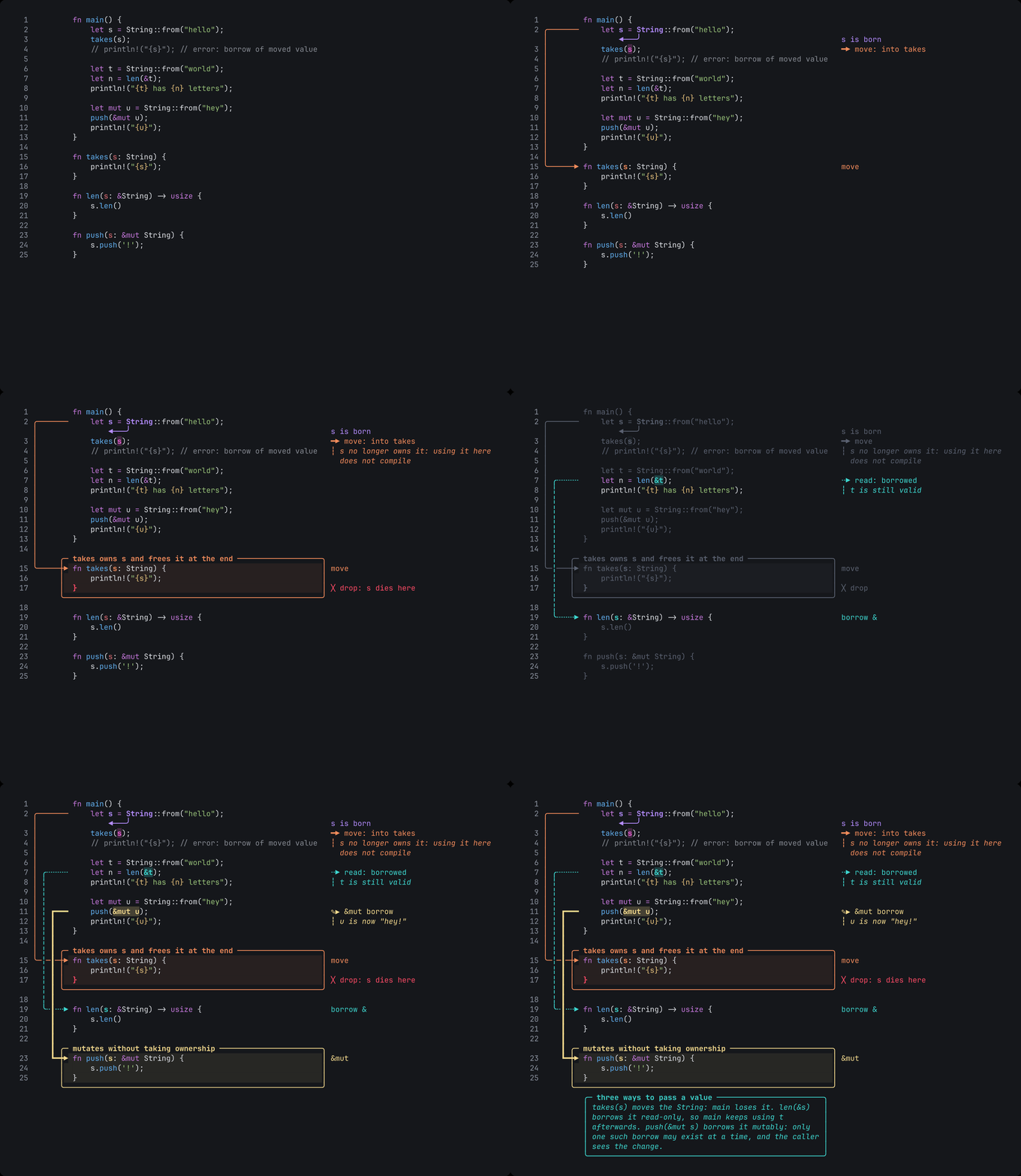
This is the first release for other people. Report a bug that you can reproduce with the bug report form. Put feedback, ideas and terminal reports in Discussions.
What you can do
- Annotate code. Each annotation is attached to the text of the code, not to a screen position. It stays in the correct place when you scroll, resize the terminal or change the theme.
- Present in steps. Run
tiza demo.tiza --presentand pressnfor the next step. Steps can have names and can go to the next step automatically. The layout of the code does not move between steps. - Follow a file. Run
tiza src/main.rs --follow. When you save the file in your editor, Tiza loads it again. The annotations move with their text. - Change the code in a step. A step can add, replace or delete lines. Tiza can type the new lines letter by letter. When you go back one step, Tiza removes the change.
- Export. Tiza exports text, Markdown, ANSI, SVG, PNG and animated GIF with no other tools. With ffmpeg installed, it also exports MP4 and WebM. It also writes asciicast and VHS files. Use
--all-stepsto get one image for each step. - Check a document.
tiza checkfinds problems before you record, for example a label that is cut. It also tells you the smallest terminal width with no cut labels. - Let an agent draw. Run
tiza mcpfor Claude Code or a different MCP client. The local API has a published JSON Schema. In supervised mode, you approve each change that an agent asks for. - Record clear video. The dark and light themes keep text easy to read after video compression. Tiza can also use the colors of your terminal (
--theme terminal). - Keep your code private. Tiza does not send data. It has no telemetry, no update check and no network code.
Install
| System | File |
|---|---|
| macOS, Apple Silicon | tiza-v0.1.0-aarch64-apple-darwin.tar.gz |
| macOS, Intel | tiza-v0.1.0-x86_64-apple-darwin.tar.gz |
| Linux x86_64 (glibc 2.35 or later: Ubuntu 22.04, Debian 12, Fedora 36 or later) | tiza-v0.1.0-x86_64-unknown-linux-gnu.tar.gz |
- Download the file for your system and its
.sha256file. - Check the file:
shasum -a 256 -c tiza-v0.1.0-<target>.tar.gz.sha256. On Linux, you can usesha256sum -c. - Extract the file:
tar -xzf tiza-v0.1.0-<target>.tar.gz - Make a folder in your PATH if you do not have one:
mkdir -p ~/.local/bin - Copy
tizato that folder:cp tiza-v0.1.0-<target>/tiza ~/.local/bin/
macOS: The binaries do not have an Apple Developer ID signature. If you download the file with a web browser, macOS stops Tiza the first time and shows "tiza" Not Opened. To fix this, run this command one time: xattr -d com.apple.quarantine ~/.local/bin/tiza. A download with curl does not have this problem.
From source (Rust 1.88 or later): run cargo install tiza. To build this tag from Git, run cargo install --git https://github.com/luiscarlosjayk/tiza --tag v0.1.0 tiza.
Tiza does not support Windows in version 0.x.
Known limits
- We tested Tiza on macOS in the Zed terminal and in Herdr. Other terminals with 24-bit color and box-drawing characters should work. We did not test tmux and other terminals (Terminal support).
- Use
findto target a code change in a step, not a line number. If you edit the file while Tiza is closed, a change by line number applies to the lines that are at that number now.
More information
To get a notice of new versions, watch the repository on GitHub (Watch → Custom → Releases).