
Reference
Themes
This page tells how to pick the colors of Tiza and how to change one color. It covers the built-in themes, the auto theme, the terminal theme, the color tokens and the theme of each export.
Pick a theme
Tiza has two built-in themes, dark and light. It also has a terminal theme that uses the colors of your terminal.
| To | Do this |
|---|---|
| Change between dark and light | Press t, or type :theme without a name. |
| Pick a theme | Type :theme dark, :theme light or :theme terminal. |
| Pick a theme when you start Tiza | Add --theme dark, --theme light or --theme terminal. |
| Follow the terminal again | Type :theme auto, or start with --theme auto. |
When you pick a theme, Tiza stops following the terminal. Tiza keeps the theme in the document, and the next save writes it. Then the next session opens with the same theme. t and --theme do not save the document. See Themes and saving.
The auto theme
A document that names no theme follows the terminal. This is the auto theme. When Tiza starts, it sends the color query to ask the terminal for its background color. A light background gives the light theme, and a dark background gives dark. The status bar shows light·auto or dark·auto.
- When the terminal sends no answer for 100 ms, Tiza stops waiting. It shows no message. A document that names no theme then gets
dark. - A pseudo-terminal with no terminal program behind it is an example of a terminal that sends no answer.
- When the variable
TIZA_NO_OSCis set, also to an empty value, Tiza does not send the color query. This applies at start and at each resize. - With
--theme auto, a document that names a theme keeps that theme until the terminal answers. :theme autosends no color query. It uses the last answer of the terminal. With no answer yet, it keeps the theme on screen until an answer comes.- Tiza keeps the keys that you type while it waits. For example,
nnright aftertiza FILE --presentmoves two steps. - Tiza sends the color query again at each resize of the terminal.
- When the theme of your terminal changes with no resize, type
kill -WINCH $(pgrep tiza)in another shell. Tiza then sends the color query again. Terminal support tells what each tmux version does with the color query. - These stop the auto theme:
t,:theme NAME,--theme NAME, a document that names a theme, and an agent that sets a fixed theme. :theme autostarts the auto theme again. Then the document names no theme.
Use the terminal colors
:theme terminal and --theme terminal draw Tiza with the palette of your terminal. The background and the text use the default colors of the terminal. The other tokens use the 16 ANSI colors of the terminal. The syntax uses the colors of the terminal too. Then Tiza looks like the rest of your terminal.
- Tiza does not pick the terminal theme by itself. When the terminal answers, the auto theme picks
darkorlight. - The tokens of the terminal theme send no 24-bit color. Use the theme in a terminal that has no 24-bit color.
- The tokens of the config file and of the document apply to the terminal theme too. Tiza sends a token in
#rrggbb,#rgborrgb()form as a 24-bit color. It does the same with an annotation color in#rrggbbform. - The terminal theme picks the tint of a highlight and of the status bar from the answer. A dark terminal gets ANSI color 8, and a light terminal gets ANSI color 7.
tgoes fromterminalto the built-in theme that matches the background of the terminal. With no answer,tgoes todark.- An export cannot use the palette of the terminal. See Exports.
Change a color
Each color of a theme has a name: its token. You can give a token a new value in a theme file, in the config file or in the document.
-
Write a TOML file with the tokens that you want to change. For example,
my-theme.toml:accent = "#fab387" note = "#f9e2af" blue = "#89b4fa" -
In Tiza, type
:theme file my-theme.toml. Or start Tiza withtiza FILE --theme-file my-theme.toml. -
Tiza puts the tokens in the document, in the field
theme_overrides. With autosave on, Tiza saves them at once.:exportandexport_imageuse them at once.tiza renderand the next session use them after the save.
- A theme file replaces all the tokens that the document had. It does not add to them.
- Press
uto undo:theme file. PressUor Ctrl-R to do it again. udoes not undo--theme-file, as for--theme.--theme-filewrites the tokens in the document when Tiza starts. With--no-save, Tiza does not write them to the.tizafile.- To use the same tokens in each document, put them in the
[theme]table of the config file. See Where the tokens go. tiza render FILE --theme-file PATHuses the file for one export, in place of the tokens of the document. It does not change the document.- The Catppuccin Mocha example is the file to copy. It sets the tokens of Tiza to the published Catppuccin Mocha colors. It passes the legibility check. See Legibility.
- No token sets a color of the syntax, such as the color of a keyword.
For example, load the Catppuccin Mocha example, a copy of examples/themes/catppuccin-mocha.toml, and highlight &t. The image is a real tiza render export with the tokens of the document:
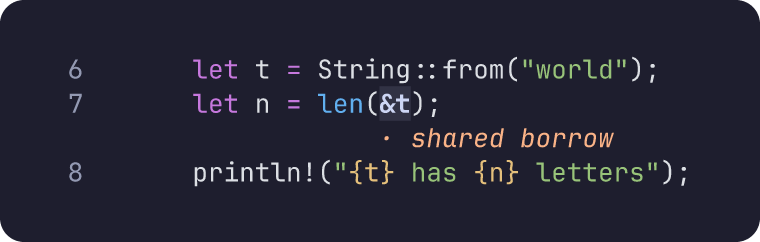
examples/ownership.rs, lines 6 to 8
:theme file catppuccin-mocha.toml
:hl 7:&t shared borrow
Put ownership.rs and catppuccin-mocha.toml in one folder. In that folder, run tiza ownership.rs:6-8 --no-save. Then type the commands.
Theme names
| Name | What it shows | Also accepted by :theme |
|---|---|---|
dark | The built-in dark theme, with the One Half Dark syntax colors. | oscuro |
light | The built-in light theme, with the One Half Light syntax colors. | claro |
terminal | The palette of your terminal. | term, ansi |
auto | dark or light, from the background of the terminal. | host |
:themewithout a name, and:theme toggle, change the theme astdoes. Unliket, they save the document when autosave is on.:tis the short form of:theme.--themeandtiza render --themetake onlydark,light,terminalandauto.theme.setandset_themetake the names and the aliases of the table, excepthost.:export theme=andexport_imagetake onlydark,light,oscuroandclaro.
| Status bar | Meaning |
|---|---|
dark·auto or light·auto | Tiza follows the terminal, or keeps this theme until an answer comes. |
terminal·auto | Tiza follows the terminal, but keeps the terminal theme until an answer comes. |
dark, light or terminal | The theme is fixed. |
Presentation mode hides the status bar.
Color tokens
The table lists each token that you can set, with its main use.
| Token | What it colors |
|---|---|
bg | The background of the code, also in an image export. |
fg | The default text. |
muted | The secondary text, such as the line numbers and the legends. |
dimmed | The code outside the focus, and the annotations that a spotlight leaves out. |
accent | The selection, the : of the command line, and a mark that has no color of its own. |
box_line | A box that has no color of its own. |
note | A note or a callout that has no color of its own. |
highlight_bg | The background of a highlight that has no color, and of the selected row in a list. |
status_bg | The background of the status bar. |
status_fg | The text of the status bar. |
cmd_bg | The background of the command line and of the panels. |
error | The error messages, and the ⬚ sign for an invisible character. |
orange, blue, green, purple, pink, cyan, yellow, red, gray | The annotation color with that name. |
rail, box_bg, arrow | Nothing: Tiza accepts these tokens and draws nothing with them. |
- In
darkandlight,orangeis theaccentcolor andgrayis themutedcolor, until you set them. - An arrow without a color takes the next color of this list:
orange,blue,green,purple,cyan,pink,yellow. To change the color of these arrows, set these tokens. - In the terminal theme,
highlight_bgis also the tint of a selection and of a mark. This is also so indarkorlightwhenbgor the mark color is a color of the terminal palette. - An export message can name
rail,box_bgorarrowwhen one of them has an ANSI color orreset.
Color values
| Value | Example | Meaning |
|---|---|---|
#rrggbb | #fab387 | An RGB color. |
#rgb | #abc | The short form: #abc is #aabbcc. |
rgb(R, G, B) | rgb(250, 179, 135) | An RGB color. Each number is from 0 to 255. |
| An ANSI name | red, bright-blue | A color of the terminal palette. |
ansiN | ansi208 | The color N of the terminal palette, from 0 to 255. |
reset | reset | The default color of the terminal. |
- An ANSI name, for example
redorbright-blue. It gives a color of the terminal palette. The ANSI names areblack,red,green,yellow,blue,magenta,cyanandwhite. Addbright-before a name for its bright color.brightbluewith no dash also works. defaultandnoneare the same asreset.- A color name of an annotation, such as
orange, is not a color value.red,blueand the other names that are also ANSI names give the colors of the terminal. - Tiza ignores the case and the spaces around a value. A token name must be in lower case:
Accentis an unknown token. - An ANSI color and
resethave no value in an export. See Exports.
Where the tokens go
| File | Where the tokens go |
|---|---|
| The config file | The [theme] table, and the subtables [theme.dark], [theme.light] and [theme.terminal]. |
| A theme file | At the top of the file, with the subtables [dark], [light] and [terminal]. |
A theme file with a [theme] table | The [theme] table, with the subtables [theme.dark], [theme.light] and [theme.terminal]. |
| The document | The field theme_overrides, with the subtables as the objects dark, light and terminal. |
For example, this config file sets a different accent on dark and on light:
[theme.dark]
accent = "#a6e3a1"

[theme.light]
accent = "#b7410e"- A subtable applies only when its theme is in use.
- When a token is both in a table and in its subtable, the subtable wins while its theme is in use.
- Tiza applies the tokens in this order, and the last one wins: the built-in theme, the config file, the document.
:theme NAMEandtchange the base theme. The tokens stay and apply on the new theme.- When a theme file has a
[theme]table, Tiza ignores the keys outside it. It does not report them.
Wrong tokens and values
- In the config file and in a theme file, Tiza ignores an unknown token, an unknown subtable, a value that is not a string and a color that it cannot read. It applies the other tokens.
- Tiza reports a value that is not a string in every subtable. It does not report a color that it cannot read in the subtable of a theme that is not in use.
- A theme file does not load when Tiza cannot read it, when its TOML is not valid, or when it has no color token to apply. An empty file and a file where no value is a string have none.
- Then
:theme fileshows the error and changes nothing.--theme-fileshows the error, and Tiza starts without the file.tiza renderexits with 1. - For the config file, Tiza writes a warning for each value that it leaves out. See Warnings of the config file.
- In the
theme_overridesof a document, a value that is not a string stops the document from opening. Then Tiza writestiza: could not open FILEand exits with 1.
The config file
The [theme] table of the config file holds your own tokens for every session. Where Tiza finds the file, when it reads the file, and its other tables are in Config file.
Messages
| Message | When |
|---|---|
theme NAME | :theme NAME or :theme changed the theme. |
theme auto: following the terminal (NAME now) | :theme auto follows the terminal, and the last answer gave NAME. |
theme auto: following the terminal (no answer yet; a resize asks again) | :theme auto follows the terminal, but the terminal has not answered. |
unknown theme (dark, light, terminal, auto, file PATH; :theme alone toggles) | :theme got a name that it does not know. |
theme file PATH: N token(s) applied on NAME | :theme file PATH or --theme-file PATH loaded the file. |
undone: theme file | u removed the tokens of the last theme file. |
redone: theme file | U or Ctrl-R put the tokens of the theme file back. |
theme KEY: expected a color string, got TYPE | A value in a table is not a string. Tiza leaves the token out. |
PATH: no color token to apply | A theme file has no token that Tiza can apply. Tiza changes nothing. |
theme [NAME] KEY: expected a color string, got TYPE | A value in a subtable is not a string. Tiza leaves the token out. |
tiza: config: PATH:LINE: [theme] KEY: expected a color string, got TYPE | A value in the [theme] table of the config file is not a string. Tiza leaves the token out. |
tiza: config: PATH:LINE: [theme.NAME] KEY: expected a color string, got TYPE | A value in a subtable of [theme] is not a string. Tiza leaves the token out. |
tiza: config: PATH:LINE: theme: expected a table, got TYPE | The theme of the config file is not a table. |
theme: unknown token `KEY` (roles: …; palette: …) | A table has a token that Tiza does not know. |
theme: unknown table [NAME] (dark, light, terminal) | A table has a subtable that Tiza does not know. |
theme KEY: VALUE: use #rrggbb, rgb(r, g, b), an ANSI name (red, bright-blue…), ansiN or reset | A token has a value that Tiza cannot read. |
theme KEY: OLD reads at R:1 on the background, pushed to NEW for 4.5:1 | A text token was too faint, and Tiza changed it. |
the terminal theme has no palette outside the terminal: exported with NAME | An export of the terminal theme used dark or light. |
theme tokens set to a terminal color have no value in an export (KEYS): the NAME theme's are used | An export replaced the ANSI and reset tokens. |
theme= must be dark or light | :export got theme=terminal or another name. |
tiza: could not open FILE | A value in theme_overrides of the document is not a string. |
`theme` must be a string: dark, light, terminal, auto or toggle | theme.set got a theme that is not a string. |
unknown theme (dark, light, terminal, auto, toggle) | theme.set got a name that it does not know. |
unknown theme (dark, light) (invalid_argument) | export_image got a theme that it does not take. |
- In
theme file PATH: N token(s) applied on NAME,Ncounts the keys at the top of the file. A subtable counts as one key, and an unknown key counts too. A value that is not a string does not count. - When Tiza cannot read a theme file, or its TOML is not valid, the message is
PATH:and the error text. - After
no color token to apply, the message gives the reports of the values that Tiza left out. - The other warnings of the config file are in Warnings of the config file.
tiza: could not open FILEends with the error text of the JSON reader. For a value intheme_overridesthat is not a string, that text saysexpected a color string or a table of color strings.- For a wrong
#orrgb()value, the text afterVALUE:tells what is wrong. :exportadds an export message after—.tiza renderwrites it on stderr.export_imagedoes not show it.
When Tiza shows the token reports
The token reports are the messages about an unknown token, an unknown table, a wrong value and a faint token.
- The TUI shows them after
:theme,:theme NAME,:theme toggle,:theme fileand--theme-file. It adds each one after the message, after;. - At start, the status bar shows the first warning of the config file and the number of warnings that
tiza configlists. The token reports of[theme]in the config file count as warnings. The TUI does not show the token reports of the document at start. Only--theme-fileshows reports at start. - The TUI shows no reports after
t, after:theme autoor after a change from an agent. tiza renderwrites each report on its own line on stderr, aftertiza:.export_imageshows no token report. Inwarning, it says what the config file left out, or that Tiza cannot read the config file.
Exports
An export cannot use the palette of the terminal. Each export picks its theme as this table shows. The Tokens column is for dark and light.
| Export | Theme | Tokens |
|---|---|---|
:export | The theme on screen, or theme=dark or theme=light. | The config file and the document. |
tiza render | The --theme flag, else the theme of the document, else dark. | The config file, and the document or --theme-file. |
export_image | Its theme, dark or light, else the theme of the document, else dark. | The config file, and the document. |
:exportexportslightwhen the auto theme showslight.tiza renderandexport_imagecannot ask the terminal. They export a document that follows the terminal asdark.tiza render --theme autouses the theme of the document, elsedark.tiza render --theme terminalexportsdark, and writes the message about the terminal theme on stderr.- With the terminal theme,
:exportuses the built-in theme that matches the background of the terminal. With no answer, it usesdark.tiza renderandexport_imagealways usedark. - An export of the terminal theme uses the plain
darkorlighttheme. No token applies: not the config file, the document,--theme-fileor[theme.terminal]. - In an export of
darkorlight, a token with an ANSI color orresettakes the color of the built-in theme.
Themes and saving
- With autosave on, these save the document at once:
:themewith or without a name,:theme file,theme.set,set_theme, and ascene patchwiththeme. See Saving. t,--theme NAMEand--theme autochange the theme of the document, but do not save it. The next save writes the change.- When you quit after
twith no other change, the document keeps its old theme. --theme-filesaves the document when Tiza starts, except with--no-save.- The document keeps a theme only when the theme is fixed. A document that follows the terminal has no
themefield.
Agents and themes
set_theme(MCP) andtheme.set(socket) takedark,light,terminal,autoortoggle. They also take the aliasesoscuro,claro,termandansi.- With no
theme, or an empty one,theme.setchanges between dark and light astdoes. - The reply has the field
auto. It tells whether the instance follows the terminal. - A
scene patchor ascene putwiththemesets a fixed theme, as:theme NAMEdoes. - Under
:supervise, atheme.setwaits for the presenter. The presenter can reject it. With no decision for 60 s, it fails. export_imagepicks its theme as Exports tells.
How it works
The color query asks the terminal with OSC 11 for the background and with OSC 10 for the text. It sends them as plain OSC, not wrapped for tmux. A background is dark when 0.299 R + 0.587 G + 0.114 B is less than half of 255.
- Tiza sends the color query only with the auto theme or the terminal theme. It sends it at start and at each resize.
- Tiza uses the answer to OSC 10 only to stop waiting early. No color of Tiza comes from it.
- At start, Tiza reads the answer before its input library reads the terminal. It gives the other keys that it read to the editor, in order.
- After start, the answer comes in as key presses. Tiza takes it out of the keys.
- Tiza does not turn on mode 2031, in which the terminal reports a change of its colors. The input library would read that report as key presses.
Legibility
The built-in themes use RGB colors that stay legible in a 1080p video. CI runs scripts/legibility.py on the last step of examples/ownership.rs.tiza, in dark and in light. The script renders a PNG and scales it to 1920×1080. Then it compresses the frame as YouTube does.
- The script measures the text colors of the SVG export against the background.
- It skips a color under 1.5:1 before the compression, because such a color is a tint, not text.
- It skips a color that fills fewer than 40 pixels of the frame.
- Each color that it measures must keep a contrast of 4.5:1 or more. Otherwise the script exits with 1.
To check a theme file, run the script with --theme-file:
python3 scripts/legibility.py examples/ownership.rs.tiza --step 6 --theme-file examples/themes/catppuccin-mocha.tomlThe script needs Python with Pillow and numpy, and ffmpeg. It runs target/debug/tiza, or the binary that --bin or TIZA_BIN names. Without ffmpeg, it exits with 2.
Tiza also keeps text legible when it applies tokens:
- It checks
fg,muted,accent,noteanderroragainstbg. Tiza reports each token that it changes. - A token under 4.5:1 moves toward black or white, whichever contrasts more with
bg. - This rule is not the dark rule of How it works. For example,
#7a7a7ais a dark background by that rule, but a faint token on it moves toward black. - The move can go all the way to black or white. Thus the token always reaches 4.5:1, as the message says.
- When it draws the code, Tiza moves a syntax color under 4.5:1 toward
fg. - Tiza does not check a color of the terminal palette. It checks no token when
bgis a color of the terminal palette. It moves no syntax color whenbgorfgis a color of the terminal palette.