
Reference
Control and invisible characters
This page tells how Tiza shows control and invisible characters in the code and in annotation texts.
Code can hold characters that a terminal acts on, for example ESC, NUL and BEL. Tiza never shows them raw or sends them raw in a text reply.
- The screen is what the TUI shows.
render_text,tiza scene textand every export show the same characters as the screen. - A text reply is the text of
get_code,list_annotationsand thetiza://coderesource. The errors that the MCP server and thetizacommands print are text replies too. - A JSON reply is the JSON that an MCP tool gives, the
tiza://sceneresource and the JSON output oftiza apiandtiza scene.
Control characters
| Character | On the screen | In a text reply |
|---|---|---|
| A C0 control (U+0000 to U+001F), except the tab and the line break | Its picture, for example ␛ for ESC, ␀ for NUL and ␇ for BEL | Its picture |
| DEL (U+007F) | ␡ | ␡ |
| A C1 control (U+0080 to U+009F) | � | � |
| A tab | Spaces to the next tab stop | A tab |
| A line break (U+000A) | A new line in a callout text, a space in a label or a callout title | A line break in a text of several lines, ␊ in a one-line text |
| A bidirectional control (bidi control) | ⬚ in the code, nothing in an annotation text | � |
- The bidi controls are U+202A to U+202E, U+2066 to U+2069, U+200E, U+200F and U+061C.
- In embedded code, a
\r\nthat is one grapheme shows ason the screen. In a file that Tiza reads, a\r\nis a line end. - A one-line text in a reply is, for example, a title or a file name.
- Each picture takes the same number of cells as the character, so the columns do not move.
get_codeandtiza://codeshow a control character in the code as its picture or�too, and afindwith the picture does not match. After the code, a note gives the real character, for example# line 4: U+001B escape, col 7. See Invisible characters in the code.
Invisible characters in the code
These are the invisible characters in the code:
- A bidi control.
- A zero-width space (U+200B) or a word joiner (U+2060).
- A byte order mark (U+FEFF) after the start of the file. Tiza drops a byte order mark at the start of the file when it reads the file.
- A zero-width joiner (ZWJ, U+200D) or a zero-width non-joiner (ZWNJ, U+200C) that joins nothing, for example
adU+200Dmin. - Each other default-ignorable character. Examples are a soft hyphen, an invisible operator and a tag character. A variation selector is one too, after an ASCII character or after a letter of a script that does not use joiners. A keycap is the exception.
On the screen, each invisible character takes one cell. Tiza draws it as ⬚ (U+2B1A) in the error color of the theme. Thus ad⬚min does not look like admin.
For example, docs/frames/invisible.rs has admin on line 1, and ad, a zero-width joiner and min on line 2. The image is a real tiza render export:
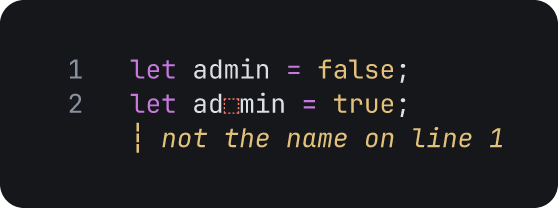
docs/frames/invisible.rs, lines 1 to 2
:note 2 not the name on line 1Open lines 1 to 2 of docs/frames/invisible.rs: tiza docs/frames/invisible.rs:1-2 --no-save. Then type the commands.
- Anchors and
findcount the real characters. Thus the columns of the graphemes do not change. get_codeandtiza://codegive the invisible characters as they are, except a bidi control, which is�.- After the code,
get_codeandtiza://codegive a note for each line with invisible characters, for example# line 3: U+200B zero width space, col 5. The note names each character, and gives its column as thecolof an anchor. The socket methodcode.getgives the same list ininvisible. See Invisible characters incode.get. - A
findthat starts or ends inside a character, for example a joiner alone inadU+200Dmin, fails where the column counts. Put the whole character in thefind, or use thelineandcolof the note. See Afindinside a character. - The note does not name a character that has a function (see the list below), a tab, or the byte order mark that Tiza drops.
Tiza draws an invisible character as it is when the character has a function:
- A joiner inside an emoji sequence or an Indic conjunct.
- A joiner after a letter of a script that uses joiners, for example the ZWNJ of a Persian word.
- A variation selector after an emoji or another symbol, in a keycap, or after an ideograph.
- A variation selector after a letter of a script that uses joiners.
- A Mongolian free variation selector or the Mongolian vowel separator after a Mongolian letter.
- The tags of a subdivision flag, for example the flag of Scotland.
Annotation texts
- A control character in an annotation text shows as its picture, as in the code.
- In a label and in a callout title, a tab, a line break, a carriage return, a vertical tab, a form feed and NEL (U+0085) become a space.
- A callout text keeps its line breaks. The other characters of that list become a space.
- Tiza does not draw
⬚for an invisible character in an annotation text. The character takes no cell. - Thus
clippedandcheckcount the cells that Tiza draws. See Reply of an annotation tool. - A label of only zero-width characters is the same as no label.
- A note or a callout text of only spaces or zero-width characters is empty. Tiza refuses it with
the note is emptyorthe callout text is empty.
JSON replies
- A JSON reply writes a C0 control as a JSON escape, for example
\nor\u001b. It writes DEL, a C1 control and a bidi control as a\uXXXXescape. - An escape is the same value as the real character.
- A JSON reply writes the other characters as they are, a zero-width space included.
- A
findmust use the real character, for example\u001bin JSON. The picture␛does not match ESC. - The socket itself writes only a C0 control as an escape. Before you print the reply of the socket, make the other characters safe.
Errors
When the find of an anchor matches nothing, the error shows a control character as a Rust escape. For example:
text "a\u{1b}b" not found in the codeThe other errors show the character as a text reply does: its picture, or � for a C1 control and a bidi control. An example is the error of a marker that matches nothing.