
Reference
Change commands
Use these commands to change or delete an annotation. Each command except :clear takes the id of an annotation, for example a1. The status bar shows the id when you add an annotation. The annotation list (L) also shows it.
Each image on this page is a frame of a tiza render export. The code is examples/ownership.rs. The first command of each frame adds the annotation that the second command changes. A deleted annotation draws nothing, so :step ID N, :del and :clear have no frame.
:label
Changes the label of an annotation.
:label ID TEXTFor example, change the label of the highlight a1:
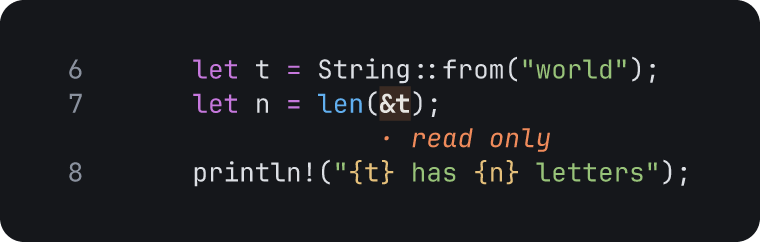
examples/ownership.rs, lines 6 to 8
:hl 7:&t shared borrow
:label a1 read only
Open lines 6 to 8 of examples/ownership.rs: tiza examples/ownership.rs:6-8 --no-save. Then type the commands.
Notes on :label
:labelalso changes the text of a note and the title of a callout.- A spotlight has no label.
:labeldoes not change it.
:color
Changes the color of an annotation.
:color ID COLORCOLOR is a color name, #rrggbb or auto. auto gives the default color back. The color names are in Color names.
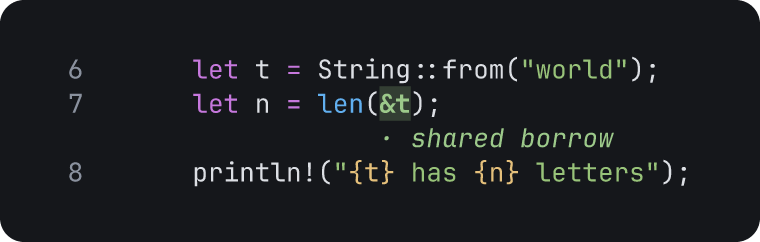
examples/ownership.rs, lines 6 to 8
:hl 7:&t shared borrow
:color a1 green
Open lines 6 to 8 of examples/ownership.rs: tiza examples/ownership.rs:6-8 --no-save. Then type the commands.
Notes on :color
:color IDwithout a color setsauto.
:set
Changes one or more properties of an annotation.
:set ID KEY=VALUE…For example, make an arrow thick and give it a bar head:
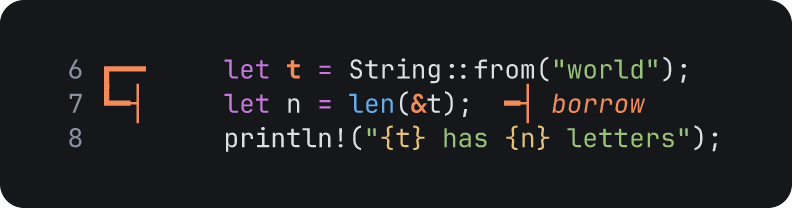
examples/ownership.rs, lines 6 to 8
:arrow 6:t/2 7:&t borrow
:set a1 stroke=thick end=bar
Open lines 6 to 8 of examples/ownership.rs: tiza examples/ownership.rs:6-8 --no-save. Then type the commands.
:set takes these properties:
| Property | Annotations |
|---|---|
label, color and step | All the annotations. label is the text of a note and the title of a callout. |
text | A callout: its paragraph. All the other annotations: the same as label. |
title | The same as label. |
stroke, route, heads, start and end | Arrows. |
border, corners and fill | Boxes and callouts. |
emphasis | Highlights and marks. |
effect | All the annotations. Experimental: draw, fade or none. See Enter effects. |
The values are the same as in Annotation commands. The fields are in Annotations.
Notes on :set
labelalso has the nametitle. On all the annotations except a callout, it also has the nametext.- On a highlight,
emphasisalso has the namestyle. effect=noneremoves the enter effect.effect=drawneeds a stroke: a box, a callout, an arrow, or a highlight or a mark with the emphasisunderline,bracketsorstrike.- Tiza also checks the stroke when you change the
emphasisof an annotation withdraw:emphasis=fillgives an error. Seteffect=fadeoreffect=nonefirst.
:step ID N
Moves an annotation to step N.
:step ID NFor example, :step a3 2 moves a3 to step 2.
Nis a step from 1 to the step after the last step.:step Nwithout an id goes to a step. See:step.
:del
Deletes one or more annotations.
:del ID…For example, :del a2 a5 deletes a2 and a5.
:deldeletes the ids in order. It stops at the first id that does not exist. It keeps the deletes before that id.:delrecords one undo step for each id. For example, after:del a1 a2, oneubrings back onlya2. Pressuagain to bring backa1.
:clear
Deletes the annotations of all the steps, or of one step.
:clear
:clear N
:clear .:cleardeletes all the annotations.:clear Ndeletes the annotations of stepN.:clear .deletes the annotations of the step on screen.uundoes:clear.