
Reference
Exports
This page tells how to export a step or all the steps of a document to a file. It lists the formats, the options and the messages of tiza render, :export and export_image.
Export a step
Use tiza render with a document and an output file:
tiza render demo.tiza --out step3.png --step 3
tiza render demo.tiza --out figure.svg --theme light
tiza render demo.tiza --out step2.md --step 2
tiza render demo.tiza --out - --format ansi | less -R
tiza render --out shot.png
tiza rendertakes a.tizadocument, a source file, a range of a source file (FILE:A-B) or-for standard input.- For a source file without a range, Tiza uses its
.tizadocument when it has one.FILE:A-Bshows lines A to B. WhenFILE.A-B.tizaexists, Tiza also draws its annotations and says so on stderr, as the TUI opens that document. - The extension of
--outselects the format.--formatoverrides the extension. --out -writes to standard output.tiza renderdoes not make a missing folder for--out, except with--all-steps.- Without a document,
tiza renderexports what the live instance shows. See The live instance. - Without
--step, an export of a document shows its last step, the same as--step LAST. A WebP is different: without--step, it is an animation of all the steps.
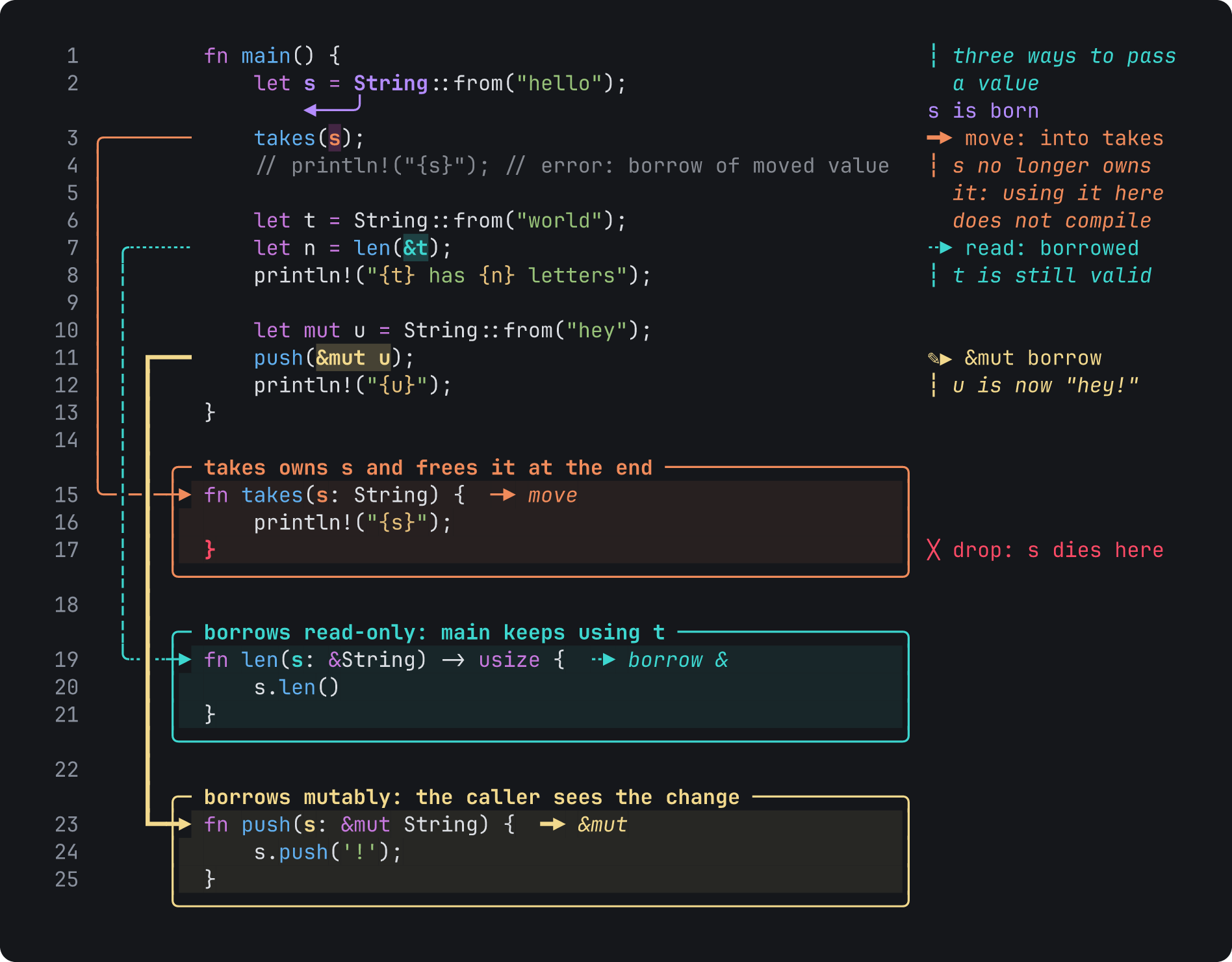
For example, this is the last step of examples/ownership.rs.tiza as a PNG at 92 columns:
Record all the steps
These formats hold all the steps of a document in one file: GIF, WebP without --step, MP4, WebM, .cast and .tape.
tiza render demo.tiza --out demo.gif
tiza render demo.tiza --out demo.webp
tiza render demo.tiza --out demo.mp4 --interval 3
tiza render demo.tiza --out demo.cast
tiza render demo.tiza --out demo.tape && vhs demo.tape- A GIF and a WebP need no other program.
- An MP4 or a WebM export needs
ffmpeg. See Video exports. - Play a
.castfile withasciinema play demo.cast. agg changes it to a GIF. - A
.tapefile is a script for VHS.vhs demo.tapeneedsvhs,ttydandffmpeg. It writes a screen recording,demo.gif.
A recording starts at step 0. In most documents, step 0 shows only the code. --skip-zero starts the recording at step 1. After it writes a .cast or a .tape file, Tiza prints a message that shows how to play it.
Export one file for each step
Give --all-steps and a folder:
tiza render demo.tiza --all-steps --out steps/Tiza writes step-00.png, step-01.png and the next numbers up to the last step. To get another format, give --format, for example --format md. An --out with an extension, such as answer.md or deck.jpg, is refused, because it is a file name. With a slash at the end, answer.md/ is a folder. All the files use the layout of the take. All the images have the same pixel size, so they align in a video editor or a slide deck.
- The format is PNG.
--format svg,webp,txt,ansiormdchanges it. The extension of--outdoes not change it. --skip-zerostarts atstep-01.- Tiza makes the folder when it does not exist.
Export from the TUI
In normal mode, type :export and a path:
:export shot.png step=3 width=100 theme=light:export writes the formats marked in Where each format works. It cannot write a recording. To record the live instance, use tiza render --out demo.gif without a document.
Export from an agent
An agent calls the MCP tool export_image with a path. The formats are in Where each format works. See export_image.
Formats
Extension of --out | --format | What Tiza writes |
|---|---|---|
.txt, another extension or none | txt | The step as plain text with box-drawing characters. |
.ansi or .ans | ansi | The step as text with 24-bit color codes, for cat or less -R. |
.md or .markdown | md | The step as text in a text code block, for a README, an issue or a chat. |
.svg | svg | The step as an SVG image, with the fonts in the file. |
.png | png | The step as a PNG image. |
.webp | webp | A lossless WebP: the step with --step, or else an animation of all the steps. |
.gif | gif | An animated GIF of all the steps. |
.mp4, .m4v or .mov | mp4 | An H.264 video of all the steps, made by ffmpeg. |
.webm | webm | A VP9 video of all the steps, made by ffmpeg. |
.cast | cast | An asciicast v3 recording of all the steps. |
.tape | tape | A VHS tape that runs Tiza in presentation mode through all the steps. |
- A
.txtor a.mdexport has no trailing spaces and no blank rows at the end. - A
.mdexport puts the document title in bold above the code block. Without a title, it has only the code block. - A
.ansiexport keeps the trailing spaces. It resets the color at the end of each line. - The text formats keep the box-drawing characters of the screen.
- An extension can be in capital letters, for example
.PNG. This is also true for:exportandexport_image. :exportandexport_imagealso take.ansand.markdown.
Where each format works
| Format | tiza render | :export | export_image |
|---|---|---|---|
txt, ansi, md, svg, png | Yes | Yes | Yes |
webp | Yes | Yes, one step | Yes |
gif | Yes | No | Yes |
mp4, webm | Yes | No | No |
cast, tape | Yes | No | No |
tiza renderandexport_imagewrite a WebP of one step when you give a step. Without a step, they write an animation, as a GIF.:exportwrites a WebP of one step, as a PNG.
Options of tiza render
| Flag | Type | Default | Meaning |
|---|---|---|---|
--out | A path or - | - | The file to write, or standard output with -. |
--format | A format | From the extension of --out | The format of the export, from Formats. |
--step | A step number | The last step, or the step on screen of the live instance | The step to export, except in a recording. |
--all-steps | None | Off | Tiza writes one file for each step, and you cannot use it with --step. |
--width | 20 to 400 columns | width of the config file, else 100. For the live instance, the width of the code area of its screen: the terminal width less the side padding on each side, from 20 to 400, or 100 when the size of the terminal is not known. For a .tape of the live instance, its terminal width. | The width of the take. |
--theme | A theme name | The theme of the document, or dark | The colors of the export. |
--theme-file | A TOML file | The overrides of the document | Theme overrides for this export, instead of the overrides of the document. |
--numbers | None | The numbers field of the document, else numbers of the config file, else on. For the live instance, what its screen shows. | Tiza shows the line numbers, and you cannot use it with --no-numbers. |
--no-numbers | None | As --numbers | Tiza hides the line numbers. |
--margin-cols | 12 to 200 cells | The margin field of the document | The largest right margin of a step or of --all-steps. A longer note, label or legend continues on the free rows under its line. When no row is free, Tiza cuts it with …. |
--lang | A language id | The --lang before render, or the detected language | The language of the code. |
--font-size | 4 to 96 px | 16 | The size of the font in an image or a video. |
--margin | 0 to 20 cells | 1.5 | The blank margin around the drawing in an image or a video. |
--radius | 0 to 100 px | 12 | The radius of the corners of the background, where 0 gives square corners. |
--scale | 0.25 to 8 | 2, or 1 for MP4 and WebM | The device scale of a PNG, a WebP, a GIF or a video. |
--no-embed-fonts | None | Off | Tiza writes an SVG without fonts, so the viewer uses its own fonts. |
--system-fonts | None | Off | Tiza adds the fonts of the system to a PNG, a WebP, a GIF, an MP4 or a WebM export, for emoji and CJK. |
--interval | 0 to 3600 seconds | 2 | How long each step stays in a recording. |
--skip-zero | None | Off | Tiza starts a recording or --all-steps at step 1. |
--title | A text | The title of the document, or Tiza in a .cast | The title of a .cast or a .tape file. |
--loop | 0 to 65535 | 0 | How many times a GIF or an animated WebP plays, where 0 plays it without end. |
--themetakesdark,light,terminalorauto.terminalhas no colors outside the terminal. An export withterminalusesdark, and Tiza says so on stderr.autouses the theme of the document, ordark.- The theme overrides of your config file also apply. See Themes.
--font-size,--marginand--radiuswork for an SVG, a PNG, a WebP, a GIF, an MP4 and a WebM export.--margin-colsalso works for a GIF, an animated WebP, an MP4, a WebM and a.cast.- A
.tapepasses--theme,--theme-fileand--langto the TUI. It refuses--numbers,--no-numbersand--margin-colswhen they change what the TUI shows. See A.tape.
Timing of a recording
| Format | Each step | The last step | Typed moves and wait moves |
|---|---|---|---|
| GIF, animated WebP, MP4, WebM | --interval, or the auto_advance_ms of the step | Two times --interval, or its auto_advance_ms | One frame for each typed unit, before the annotations of the step |
.cast | --interval, plus the wait moves of the step that are not stale | --interval | No frames: each step shows its final code |
.tape | --interval, or the time of its typed moves and wait moves plus 0.5 s when that is longer | Its own time, plus one more --interval | The real TUI types them |
- A GIF counts time in units of 10 ms. Tiza rounds each frame up to a full unit, and to at least 20 ms.
- An animated WebP, an MP4 or a WebM export times each frame as the GIF does. Thus it lasts as long as the GIF.
- In a GIF, an animated WebP, an MP4 or a WebM, a step with
auto_advance_msstays that long after its typed frames. The message of the export names these steps. - A
.castdoes not useauto_advance_ms. - In a
.tape, a step withauto_advance_msstays for its typing time plusauto_advance_ms. The tape sends nonafter it, because the TUI goes to the next step by itself. - A
.castfile has one asciicast marker for each step. A player goes from one step to the next with these markers.
The fields auto_advance_ms, code.patch and wait are in Document format.
:export
:export writes a step to a file from the TUI. Its syntax and its options are in :export.
theme=also takes the Spanish aliasesoscuroandclaro.- A relative
PATHstarts at the folder where you started Tiza.~at the start is your home folder. - Tiza makes the folders that are missing. It writes over a file that exists.
:exportkeeps the focus of the screen. It never draws the live pointer.- An SVG, a PNG or a WebP from
:exportuses the default font size, margin, radius and scale oftiza render. - A WebP from
:exportis one step, with the pixels of the PNG. - With a theme that has no colors outside the terminal, the message tells which theme the export uses.
export_image
The MCP tool export_image exports the live document. It does not change the TUI.
| Field | Type | Default | Meaning |
|---|---|---|---|
path | string | Required | The file to write, with an extension that selects the format. |
step | integer | The current step | The step to export, except in an animation: a GIF, or a WebP without step. |
width | integer, 20 to 400 | The width of the code area of the screen: the terminal width less the side padding on each side, from 20 to 400, or 100 when the size of the terminal is not known | The width of the take, in columns. |
theme | dark or light | The theme of the document, or dark | The colors of the export. |
scale | number, 0.25 to 8 | 2 | The device scale of a PNG, a WebP or a GIF. |
font_size | number, 4 to 96 | 16 | The size of the font in px. |
interval | number, 0 to 3600 | 2 | How long each step of a GIF or an animated WebP stays, in seconds. |
skip_zero | boolean | false | Starts a GIF or an animated WebP at step 1. |
themealso takesoscuroandclaro.- A relative
pathstarts at the current folder oftiza mcp. The tool does not make missing folders. - A GIF or an animated WebP from
export_imageplays without end. export_image,tiza renderand:exportapply the[theme]overrides of your config file.export_imagereads the config file of thetiza mcpprocess.- In
warning,export_imagesays what the config file left out, or that Tiza cannot read the config file. The export goes on. - When the theme has no colors outside the terminal,
export_imageusesdark. Its reply does not say so. export_imagechecksscalefor a PNG, a WebP and a GIF, andfont_sizefor these and an SVG, astiza renderdoes. It checksintervalfor each format.- An export that takes more than 120 s stops. The tool writes nothing and replies with an error.
The reply has these fields:
| Field | Meaning |
|---|---|
path | The path of the file. |
bytes | The size of the file. |
format | The format: png, svg, txt, ansi, md, gif or webp. |
step | The step in the file, except in the reply for an animation. |
warning | What the config file left out, or that Tiza cannot read the config file. Then, except in the reply for an animation, that the step you asked for does not exist. The parts are separated by ; . |
frames | The number of frames, only in the reply for an animation. |
steps | The steps of the animation, for example 0-7, or 1-7 with skip_zero. Only in the reply for an animation. |
An animation is a GIF, or a WebP without step.
Errors of export_image
| Message | When |
|---|---|
path must end in .png, .svg, .txt, .ansi, .md, .gif or .webp (invalid_argument) | The extension of path is not a format of export_image. |
unknown theme (dark, light) (invalid_argument) | theme has another value. |
width=N: use a number between 20 and 400 (invalid_argument) | width is out of the range. |
scale=N: use a number between 0.25 and 8 (invalid_argument) | scale is out of the range. |
font-size=N: use a number between 4 and 96 (invalid_argument) | font_size is out of the range. |
interval=N: use a number of seconds between 0 and 3600 (invalid_argument) | interval is out of the range. |
a W×H px image is over the limit (16384 px per side, 100000000 px in all): use a smaller width, scale or font_size (invalid_argument) | The PNG, the WebP or a frame of an animation is too large. |
N lines of code make an image at least H px high, over the limit (16384 px per side, 100000000 px in all): use a smaller scale or font_size, or export a range of lines with `tiza render FILE:A-B` (invalid_argument) | The code of the document alone makes the image too large. export_image finds this before it draws anything. |
N lines of code make an SVG at least H px high, over the limit (131072 px per side, 6400000000 px in all): use a smaller font_size, or export a range of lines with `tiza render FILE:A-B` (invalid_argument) | The code of the document alone makes the SVG too large. export_image finds this before it draws anything. |
a W×H px SVG is over the limit (131072 px per side, 6400000000 px in all): use a smaller width or font_size (invalid_argument) | The SVG is too large. |
a W×H px image is not a WebP size (1 to 16383 px per side) (invalid_argument) | The WebP has 16384 px on a side. |
No Tiza instance is listening on SOCKET | No live instance answers on the socket of the MCP server. |
The Tiza instance on SOCKET did not answer within 75 s: it is busy or stopped. Ask the user to look at the Tiza terminal. | The live instance got the request, but it did not reply in time. |
The Tiza instance on SOCKET closed the connection before it answered: it possibly quit. Ask the user to look at the Tiza terminal. | The live instance closed the connection before it replied. |
MESSAGE (CODE) | The live instance refuses a request, and export_image passes on its error. |
the live document cannot be exported | Tiza cannot load a view of the live document. |
could not write PATH | Tiza cannot write the file. |
export_image did not finish within 120 s, and Tiza stopped it: nothing was written. | The export takes more than 120 s. |
internal error: the tool export_image call failed with a bug in Tiza (a panic; its message is on the MCP server's stderr). Please report it; the live instance is unaffected | A bug in Tiza stops the export. |
the live document cannot be exportedends with the reason.could not write PATHends with the error of the system.- The
No Tiza instancemessage then gives the error of the system in brackets. It then asks the user to opentiza <file>, or to pass--socketor--sessionto the MCP server. - The message about 120 s continues with advice: export fewer steps, a smaller size or a still. It also says that
tiza renderin a terminal has no deadline.
Messages
tiza render writes its messages on stderr.
- Each error message and each warning message of Tiza starts with
tiza:. The tables do not show this prefix. - The
ffmpeg not foundmessage has three lines. Only the first line has the prefix. - The error output of
ffmpegitself has no prefix. - The
wroteandplay it withmessages and the message with theffmpegcommand do not have this prefix. - An error exits with code 1.
- A usage error exits with code 2. Examples are an unknown flag, an unknown value of
--format, a--loopover 65535 and--stepwith--all-steps. Its message starts witherror:. - A missing
ffmpegalso exits with code 2.
| Message | When |
|---|---|
wrote PATH (N bytes) | Tiza writes a file. |
wrote PATH (N bytes): N frames, W×H px, S s per loop, N colors, loops forever | Tiza writes a GIF. |
wrote PATH (N bytes): N frames, W×H px, S s per loop, loops forever | Tiza writes an animated WebP. |
wrote N files to FOLDER (steps A-B, W×H px each) | Tiza writes the files of --all-steps. |
step N does not exist (the document has steps 0 to L); showing step L | --step is after the last step, and Tiza exports step L. |
refusing to write PNG bytes to the terminal; pass --out file.png | --out - with a PNG, when standard output is a terminal. |
refusing to write WebP bytes to the terminal; pass --out file.webp | --out - with a WebP of one step, when standard output is a terminal. |
a .EXT needs a file: pass --out demo.EXT | --out - with a GIF, an MP4 or a WebM. |
an animated .webp needs a file: pass --out demo.webp, or --step N for a still | --out - with a WebP and no --step. |
--all-steps writes one file per step: pass a directory, --out steps/ | --all-steps with --out -. |
--all-steps writes still images (png, webp, svg, txt, ansi, md); a .EXT already holds every step: `--out demo.EXT` without --all-steps | --all-steps with a recording format, or with an --out that ends in the extension of one and no image or text --format. |
--all-steps writes one file for each step into a folder, and OUT is a file name. Pass a folder, for example --out steps/ --format FORMAT | --all-steps with an --out that has an extension, such as answer.md or deck.jpg, and is not a folder. FORMAT is the --format that you give, else the format of the extension, else png. |
--all-steps needs a directory, and PATH is a file | --out of --all-steps is a file. |
--skip-zero leaves nothing to write: this document only has step 0 (no annotations or moves) | --all-steps --skip-zero with a document that has no annotations and no moves. |
could not rasterize the PNG: a W×H px image is over the limit (16384 px per side, 100000000 px in all): use a smaller width, scale, font size or margin, or export fewer lines (FILE:A-B) | The image is too large. |
could not encode the WebP: a W×H px image is not a WebP size (1 to 16383 px per side) | The WebP has 16384 px on a side. |
- A GIF or an animated WebP that plays a fixed number of times says
plays N×instead ofloops forever. - A GIF or an animated WebP with one frame says
1 frame.Shas one decimal. - For
.m4vand.mov, theneeds a filemessage says.mp4. - When steps have
auto_advance_ms, the message ends with, step N timed by its auto_advance_msor, steps N, M timed by their auto_advance_ms. The message of an MP4 or a WebM export ends the same way. - A single file of
--all-stepsgiveswrote 1 file to FOLDER (step N, W×H px). Only a PNG or a WebP run gives the size. - For a GIF, the message about a large image starts with
could not encode the GIF:. For a WebP, it starts withcould not encode the WebP:. For a video, it starts withcould not rasterize a frame:. - When Tiza cannot write a step, a
.castor a.tape, the message iscould not write PATH. - A GIF, an animated WebP and a file of
--all-stepsgo to a temporary file next toPATHfirst. When the write fails, the message iscould not write PATHtoo, and Tiza removes the temporary file. - For an MP4 or a WebM,
ffmpegwrites the file. When it cannot, the message isffmpeg failed. - The
could not writemessages end with the error of the system.
Errors of tiza render
| Message | When |
|---|---|
could not open FILE | Tiza cannot open the document or the source file. |
could not read the document from stdin | Tiza cannot read a document from standard input. |
no Tiza instance is listening on SOCKET (open `tiza <file>` or pass --socket/--session) | No live instance answers on the socket. |
MESSAGE (CODE) | The live instance refuses a request, and Tiza passes on its error. |
unexpected scene.get response or unexpected status response | The live instance sends a reply that Tiza cannot read. |
the live document cannot be rendered | Tiza cannot load a view of the live document. |
could not create FOLDER | Tiza cannot make the folder of --all-steps. |
width=N: use a number between 20 and 400 | --width is out of the range. |
--margin-cols=N: use a number between 12 and 200 | --margin-cols is out of the range. |
font-size=N: use a number between 4 and 96 | --font-size is out of the range for an image or a video. |
scale=N: use a number between 0.25 and 8 | --scale is out of the range for a PNG, a GIF or a video. |
interval=N: use a number of seconds between 0 and 3600 | --interval is out of the range. |
--margin=N: use a number of cells between 0 and 20 | --margin is out of the range, or is not finite (NaN or inf). |
--radius=N: use a number of px between 0 and 100 | --radius is out of the range, or is not finite (NaN or inf). |
N lines of code make an image at least H px high, over the limit (16384 px per side, 100000000 px in all): export fewer lines (FILE:A-B), or use a smaller scale, font size or margin | The code of the document alone makes a PNG, a WebP, a GIF or a video too large. tiza render finds this before it draws anything. |
N lines of code make an SVG at least H px high, over the limit (131072 px per side, 6400000000 px in all): export fewer lines (FILE:A-B), or use a smaller font size or margin | The code of the document alone makes an SVG too large. tiza render finds this before it draws anything. |
a W×H px SVG is over the limit (131072 px per side, 6400000000 px in all): use a smaller width, font size or margin, or export fewer lines (FILE:A-B) | The SVG is too large. |
These messages end with the error of the system or the reason: could not open FILE, could not read the document from stdin, the no Tiza instance message, the two unexpected messages, the live document cannot be rendered and could not create FOLDER.
The other messages of tiza are in Messages.
Warnings of tiza render
| Message | When |
|---|---|
the terminal theme has no palette outside the terminal: exported with dark | The theme is terminal. |
theme tokens set to a terminal color have no value in an export (TOKENS): the dark theme's are used | A theme override sets a token to a color of the terminal. |
config ignored | Tiza cannot read your config file. |
no grammar for `LANG`; the code is shown as plain text | --lang names a language that Tiza cannot color. |
N annotations outside the code and not drawn: IDS | Annotations of the document point at lines that the code does not have. |
tiza check gives the problem of N annotations: IDS | Annotations of the document are on lines of the code, but they fail another check. For example, a mark has a kind that Tiza does not know, or a span goes past the end of its line. tiza check gives each problem. |
the file has N lines: range A-B clamped to C-D | The range of FILE:A-B goes after the last line of the file. |
- In
tiza render, theterminalwarning always saysdark. In:export, it can saylight. - The tokens warning says
lightinstead ofdarkwhen the export uses the light theme. config ignoredends with the error.- An export also prints the warnings of the document. Examples are a
stepsentry after the last step and arebindentry for an annotation that is not there. - An export also prints the notes about the theme overrides of the config file, the document or
--theme-file. - When Tiza cannot read the
--theme-file, the export stops with an error.
Messages of --all-steps
A run into a folder that has files of an earlier run can give these messages:
| Message | When |
|---|---|
removed N files from an earlier run: NAMES | Tiza removed old step files of the same format. |
FOLDER also holds N files of another run, left as they are: NAMES | The folder has step files of another format. |
FOLDER also holds N entries named like a step that are not a regular file, left as they are: NAMES | A folder or a symbolic link has the name of a step file. |
could not remove N files from an earlier run (ERROR), left as they are: NAMES | Tiza could not remove an old step file. |
NAMESshows at most six names. With more, it shows five names andand N more.- With one file, the messages say
1 file,1 entryandleft as it is. - In the
entriesmessage, each name has its kind, for examplestep-08.png (a directory).
See Files of --all-steps.
Messages of video and tape exports
| Message | When |
|---|---|
ffmpeg not found on PATH (or in $TIZA_FFMPEG), and Tiza never bundles it. | An MP4 or a WebM export cannot find ffmpeg, and exits with code 2. |
ffmpeg failed (STATUS). The frames are correct: make sure that your ffmpeg build has the codec of this format | ffmpeg gave an error. |
could not run PATH | Tiza cannot run the ffmpeg file that it found. |
could not create PATH | Tiza cannot make the temporary folder of the frames. |
play it with `vhs PATH` (needs vhs, ttyd, ffmpeg); `--out NAME.gif` needs nothing | Tiza writes a .tape file. |
play it with `asciinema play PATH` (GIF: `agg PATH NAME.gif`) | Tiza writes a .cast file. |
the live document has no .tiza on disk yet for the tape to open: save it in Tiza (:w) or render a .tiza file | A .tape of the live instance, when its document is not on disk. |
the tape opens PATH, which this instance does not autosave: save it (:w) first so it holds what is on screen | A .tape of the live instance, with autosave off. |
cannot write a .tape for the document path «PATH»: it holds a control character, a newline or a `"`, which VHS would read as commands of its own; rename the file | A path in the tape has a control character, a newline or ". |
cannot write a .tape for the value «VALUE»: it holds a control character, a newline or a `"`, which VHS would read as commands of its own | The value of --theme-file or --lang has a control character, a newline or ". |
a .tape drives the TUI, which takes the line numbers from the document or config.toml: set them with :numbers in Tiza, or export a .gif | --numbers or --no-numbers would change the line numbers that the TUI shows. |
a .tape drives the TUI, which takes the margin from the document: set it with :margin in Tiza, or export a .gif | --margin-cols would change the margin of the document. |
- After the
ffmpeg not foundmessage, Tiza shows how to installffmpeg. It also says that.gifand.castneed no other program. - When
ffmpegfails, Tiza writes the fullffmpegcommand on stderr, before theffmpeg failedmessage. The command shows the codec and the options thatffmpeggot. could not run PATHandcould not create PATHend with the error of the system.- The tape message says
output pathinstead ofdocument pathwhen the path of--outhas the problem.
Messages of :export
| Message | When |
|---|---|
exported step N to PATH (N bytes) | Tiza writes the file, and PATH is the full path. |
step N does not exist (the document has steps 0 to L); exported step L to PATH (N bytes) | step= is after the last step. |
the path's extension picks the format (.txt .ansi .md .svg .png .webp) | The extension is not a format of :export. |
PATH: record every step from the shell with `tiza render --out PATH`, which records this instance with no FILE | The extension is .gif, .mp4, .webm, .cast or .tape. |
step= must be a number | step= is not a number. |
width= must be a number between 20 and 400 | width= is not a number. |
width=N: use a number between 20 and 400 | width= is a number out of the range. |
theme= must be dark or light | theme= has another value. |
unknown option (step, width, theme) | An option has another name. |
could not create the folder PATH | Tiza cannot make a folder of the path. |
could not write PATH | Tiza cannot write the file. |
could not rasterize the PNG: a W×H px image is over the limit (16384 px per side, 100000000 px in all): use a smaller width, scale, font size or margin, or export fewer lines (FILE:A-B) | The PNG is too large. |
could not encode the WebP: a W×H px image is over the limit (16384 px per side, 100000000 px in all): use a smaller width, scale, font size or margin, or export fewer lines (FILE:A-B) | The WebP is too large. |
could not encode the WebP: a W×H px image is not a WebP size (1 to 16383 px per side) | The WebP has 16384 px on a side. |
a W×H px SVG is over the limit (131072 px per side, 6400000000 px in all): use a smaller width, font size or margin, or export fewer lines (FILE:A-B) | The SVG is too large. |
The messages could not create the folder PATH and could not write PATH end with the error of the system.
Special cases
The live instance
Without a document, tiza render exports the document of the live instance. Give --socket or --session to select the instance.
- The export shows the views that the instance shows.
- The export leaves out what the screen leaves out at that step.
- A
.tapeopens the.tizafile of the instance. The tape names it relative to the folder of the tape. Runvhsfrom that folder. - With
--out -, the tape names it relative to the current folder.
export_image uses the same rules for the step, the width and the views.
Standard output
--out -writes a text format, an SVG, a.castor a.tapeto standard output.- A PNG or a WebP of one step goes to standard output only through a pipe or a redirect.
- A GIF, an animated WebP, an MP4 and a WebM need a file.
- A
.tapeon standard output writes its video todemo.gif.
A .tape
A .tape starts the real TUI with tiza DOCUMENT --present --no-socket --step N --no-save. N is 0, or 1 with --skip-zero. VHS then makes a screen recording of the TUI.
--no-save: the recording never writes the document.--theme,--theme-fileand--langalso go to the TUI.--theme autodoes not go, because the TUI then shows the theme of the document, as the export does.--themeand--theme-filealso set the colors of the VHS window.- Without
--theme, a document that names a theme shows that theme. A document that names no theme follows the terminal, and that terminal is the VHS window. - The
[theme]overrides and the[defaults]of the config file on the computer that runsvhsalso apply to the TUI, for examplepadandeffect_fps. - The TUI takes the line numbers from the document, else from the config file. It takes the margin only from the document. Tiza refuses
--numbers,--no-numbersand--margin-colswhen they change what the TUI shows. Set them with:numbersand:marginin Tiza, or export a GIF. --widthsets the size of the window.--titleis only a comment in the tape.
A step after the last one
tiza render --step N, :export step=N and export_image export the last step when N is after it. Each one says so: tiza render on stderr, :export in its message, export_image in warning. A recording does not use --step, so it gives no message.
Video exports
An MP4 or a WebM export starts ffmpeg. Tiza uses $TIZA_FFMPEG, or else the first ffmpeg in your PATH. Tiza ignores a TIZA_FFMPEG that has only spaces or nothing. Tiza does not include ffmpeg and does not download it.
- Without
ffmpeg, the export stops with exit code 2. It writes no file. - The video has 30 frames each second. Tiza makes its width and its height even numbers.
- An MP4 uses H.264 and
yuv420p. A WebM uses VP9 andyuv420p. - The temporary files are in Video exports.
Files of --all-steps
Each name is step-, the number of the step, a dot and the format. The number has the digits of the last step, and at least two.
A new run into the same folder removes the old step files of the same format that it did not write. Thus a step-%02d.png pattern, for example in ffmpeg, does not get an old frame. A file is an old step file only when all of these are true:
- Its name is
step-, a number, a dot and a lowercase format:png,webp,svg,txt,ansiormd. - The number has the same count of digits as the names of this run.
- It is a regular file.
- Tiza keeps the old step files of another format, and names them.
- Tiza keeps a folder or a symbolic link with the name of a step file, and names it.
- Tiza keeps other names, for example
step-1.png,STEP-05.PNGorstep-05.png.bak.
Large images
A PNG, a GIF frame or a video frame can have at most 16384 px on each side. A WebP or a frame of a WebP can have at most 16383 px on each side. Each one can have at most 100000000 px in all. Use a smaller --width, --scale, --font-size or --margin for a larger document, or export a range of lines with FILE:A-B.
Tiza finds a document that is too large before it draws it, so the export stops at once and uses little memory:
- Before the layout,
tiza renderandexport_imagecount the lines of code that the export shows. Each line takes at least one row, so the image is at least that high. - Before the SVG,
tiza render,:exportandexport_imagecalculate the size of the image from the layout. - An SVG has a higher limit: 131072 px on each side and 6400000000 px in all, at the size of the take (an SVG has no
--scale). Its file holds the text of each row, so a very long document makes it large too.
Fonts
The fonts are in the tiza binary. Thus an image export does not depend on the fonts of the system, except in the cases of this list.
- JetBrains Mono draws the code and the labels. Tiza has the regular, bold, italic and bold italic faces. The license of JetBrains Mono is the SIL Open Font License.
- Tiza Symbols draws the symbols that JetBrains Mono does not have, for example ★ and ✎. It is a subset of DejaVu Sans Mono.
- An SVG has the regular face in the file. It has the bold, italic and bold italic faces and Tiza Symbols only when the step uses them.
- With
--no-embed-fonts, the SVG has no fonts. It is smaller, but it can look different in each viewer. - With
--system-fonts, Tiza also uses the fonts of the system, for example for emoji. Then the export can change from one computer to another. :exportandexport_imagealways put the fonts in an SVG, and never use the fonts of the system.
How it works
One layout for the take
All exports use the layout of the take. Tiza sizes the arrow lanes, the box band and the code column once, for all the steps. Thus the code does not move left or right from one step to the next, and each arrow keeps its lane. A label that fits at step 1 also fits at the last step.
The take has no empty rows for the annotations of later steps. When a step adds a row above or under a line, the code under that row moves down at that step. Examples are a note or a callout under its line, the row of an underline or of brackets, and the border of a box. A step with a code.patch or a code.link changes the code, so the code can also move at that step.
Tiza then makes all the frames of a GIF, an animated WebP or a video, or all the files of --all-steps, the same size. It adds the background color to the smaller ones.
A typed frame of a GIF, an animated WebP or a video shows different code. Thus Tiza sizes its layout separately.
Normal mode sizes the arrow lanes, the box band and the code column for the step on screen. Thus at an earlier step, a label in normal mode can be in a different place from the take. :layout stable shows the layout of the take in normal mode. The status bar then shows ⊞ stable. :layout dynamic returns to the layout of the step on screen. tiza check checks the take, not the screen.
The GIF
Tiza draws each frame as a PNG export does, then encodes the GIF itself. Some pixels at the edges of the letters can be a little different from the PNG. You cannot see the difference.
- One palette of at most 256 colors holds the colors of all the frames.
- When the frames have more than 256 colors, Tiza keeps the most frequent colors exactly. Examples are the background, the code and the vertical lines of the arrows. It mixes the other colors into the rest of the palette.
- Tiza does not dither. Thus the text stays sharp.
- After the first frame, each frame holds only the rectangle that changed.
The WebP
Tiza draws each frame as a PNG export does. Then libwebp, the WebP library of Google, encodes it without loss. The tiza binary contains libwebp, so a WebP export needs no other program.
- A WebP has all the pixels of the PNG, also the transparent pixels of the round corners.
- In an animation, each frame after the first holds only the rectangle that changed. When a frame is the same as the frame before it, Tiza keeps one frame for the two times. When all the frames are the same, the WebP is a still.
- The same document gives the same bytes each time.
- A WebP is usually smaller than the PNG or the GIF of the same steps.
- The license of libwebp is the BSD 3-Clause License, with a patent grant. The release archives include it as
LICENSE-libwebp.txt.
The videos
Tiza writes the frames as PNG files to a temporary folder, with a list of their durations. Then ffmpeg encodes the list. Tiza cuts the video at the sum of the durations, so it has the same length with each version of ffmpeg. Tiza removes the temporary folder at the end.
Writing the file
A GIF, an animated WebP, an MP4, a WebM, the files of --all-steps and the file of export_image go to a temporary file first. Then Tiza renames it. Thus a stopped export does not leave a part of a file at the final name. How Tiza writes a file gives the names of the temporary files.