
Guides
Check before you record
Use this checklist before you record a video or a GIF. tiza check finds the problems of a document before you record it.
Tiza is a terminal tool that draws annotations on code. To install it, see Install.
Checklist
- Run
tiza check demo.tiza. It loads the document as the TUI does, and lists every problem at once. - Fix the errors. When there is an error,
tiza checkexits with 1. - Read the warnings. Add
--strictto make a warning also exit with 1. - Pick the width. The last line of the report gives the narrowest width from which no label is cut. Use that width or more. A
clipped_codewarning gives the width from which no code line is cut, or tells you that no width up to 400 shows every code line whole. - Use demo values for tokens, passwords and credentials. The audience sees what is in the file.
- Set up the terminal. See Terminal and font.
- Before you record, type
:layout stable, which shows the take, and go through the steps in normal mode. Look for a!badge on the status bar. See Badges on the status bar.
What check reports
tiza check does not change any file. It checks the labels and the code lines at the width that you record at: the width of your config file, else 100 columns, or --width N.
The table gives the usual problems. Each finding in the JSON output also has a code.
| Problem | Level |
|---|---|
The document does not follow the .tiza format. | Error |
An anchor, a marker or a move target does not match at its step. A scroll move is the exception. | Error |
A move target matches more than one time at its step, and the move has no occurrence. A scroll move is the exception. | Error |
The target of a scroll move does not match at its step, or a find matches more than one time and the move has no occurrence. The move does not place the view, or goes to the first match. | Warning |
| A linked file cannot be read. | Error |
An id in the ids of a spotlight is unknown. | Error |
| Two annotations have the same id. | Error |
| A move removes the code that an annotation is on. | Warning |
An annotation is outside the code.link window of its step. | Warning |
A later code.patch pushes an annotation out of the code.link window. | Warning |
| An annotation belongs to a file that its own step does not show. | Warning |
A label is cut with …, or has no space and is not drawn, at the width that you record at. | Warning |
A code line is cut with … at the width that you record at. | Warning |
| A step changes nothing. | Warning |
The until of a spotlight is before its step. The spotlight never shows. | Error |
An annotation has the enter effect draw but no stroke, or an effect that this version of Tiza does not know. | Warning |
| A move has an action, a value or a key that this version of Tiza does not know. Tiza skips the move, uses the default value, or ignores the key. | Warning |
A marker (find_start or find_end) matches more than one time. | Warning |
A rebind names an unknown id. Tiza ignores that rebind. | Warning |
tiza checkreports a file that its own step does not show also when the file shows at other steps. Tiza never draws the annotation at its own step.- For a marker that matches more than one time, the warning gives the lines of each match. The range takes the first match.
Each finding is one line: LEVEL: ID, step N, FILE, LINE: MESSAGE.
LEVELiserrororwarning.ID,step N,FILEandLINEshow only when they apply. With none of them, the line isLEVEL: MESSAGE.FILEshows for a finding in a linked file.LINEisLand the line number of the code. For aschemafinding, it isline N, the line in the.tizafile.
For example:
error: x1, step 2, L99: line 99 does not exist (the document spans 1 to 25)
warning: step 7: nothing new on this step: the presenter presses a key and nothing changes
The width line
The report ends with the narrowest width from which no label is cut, at that width and at each wider width. For example, for examples/ownership.rs.tiza, the line is:
no label is clipped at 91 or wider (`tiza render --width 91`)At a narrow width, notes go under their lines. Then a narrower width can be clean again. When you ask for such a width, the report gives that range too. For example, with --width 80:
no label is clipped at 91 or wider; 70-84 are clean too (notes go under the lines below 85 columns)- When no width up to 400 shows each label, the line is
no width up to 400 shows every label whole: shorten the labels. - When the document does not load, the report has no width line.
Badges on the status bar
The status bar shows the terminal size as COLS×ROWS. It shows a ! badge only when the step on screen cuts or hides a label, a note or a code line.
| Status bar | Meaning |
|---|---|
! N labels cut | N labels or notes are cut with …, or are not drawn. |
! code needs N cols | A code line is cut. |
- In
! code needs N cols,Nis the narrowest terminal width that shows every code line of the step. - In normal mode, the badge tells what the screen cuts, and
tiza checktells what the take cuts. With:layout dynamic, the default, the screen at an earlier step has no space yet for the arrows, the boxes and the code of later steps, so the two can differ. See:layout. - The status bar shows one badge at a time.
! code needs N colscomes before! N labels cut. - When the status bar has no space,
! N labels cutgets shorter and shows only!. - The
statusreply of the API lists the details inwarnings, for example2 labels cut at 40 columns: a4, a3.
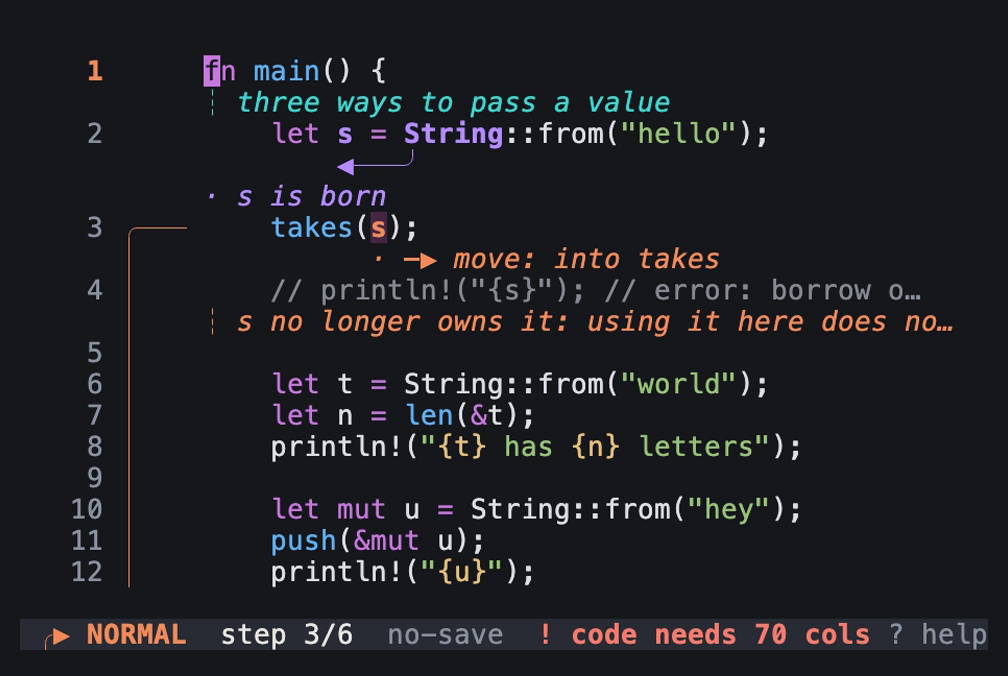
Step 3 of examples/ownership.rs.tiza at 58 columns: an image of the TUI in a real terminal of 58 columns and 20 rows, with the Menlo font.
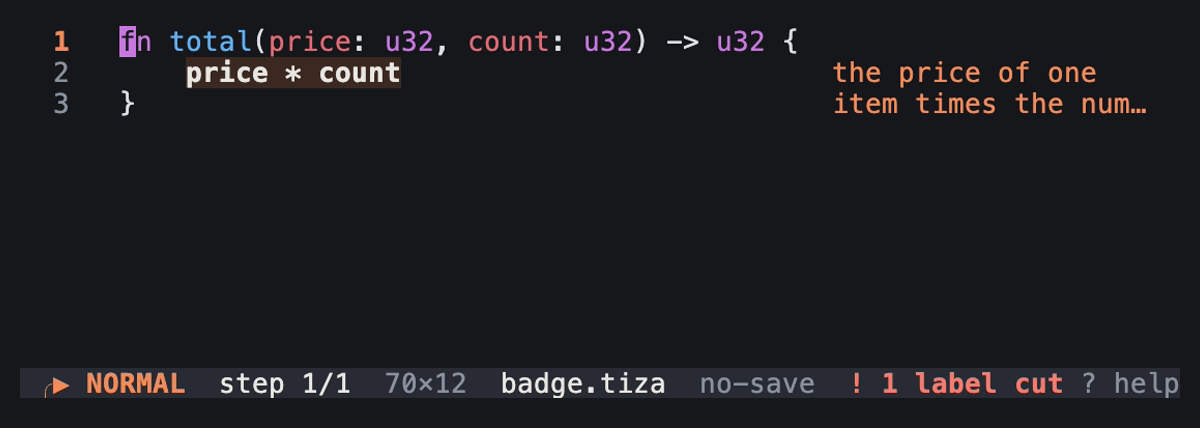
A document of three lines with one long label, at 70 columns: an image of the TUI in a real terminal of 70 columns and 12 rows, with the Menlo font.
Terminal and font
- Use a full-screen terminal, or one that fills half of the screen next to Zed.
- Use a font of 18 to 22 px.
- Keep a snippet to 60 columns or fewer.
- The exports set all the text in JetBrains Mono: the code, the notes, the labels and the legends. Use JetBrains Mono in the terminal to make it match the exports. Any other monospace font also works.
Narrow terminals
- Below about 100 columns, Tiza draws notes under their lines, not in the margin.
- The width depends on the document.
tiza checkgives it: see The width line. - For an arrow between two lines, the label then goes on the row of the arrowhead, after the code, when it fits. Otherwise, it goes on the row below. In both places, the glyph of the arrow comes first:
─▶ move. Thus the label reads as part of the arrow, not as a separate comment. - The label of an arrow on one line goes on a row under the arrow.
- On a narrow terminal, Tiza also draws a callout with
placement: autoorplacement: marginunder its lines. - By default, Tiza keeps one blank column at each side.
padin the config file changes this default.:pad V Hchanges the padding.:pad 0 0removes it.:pad defaultsets it back.
JSON output
tiza check --json gives the same findings to a script. Its fields and codes are in Check report.
Check a live instance
A live instance gives the same report for the document that it holds. The report includes the changes that are not saved. Use tiza api check '{"width": 108}', or the MCP tool check.
- Only a live instance gives
stalefindings. - The reply of a live instance also has
revision.
How it works
Both themes use explicit RGB colors for 1080p video. scripts/legibility.py runs in CI on the last step of examples/ownership.rs.tiza, in the dark and the light theme. It measures each text color of that frame after a compression like the one on YouTube. Each one keeps a contrast of 4.5:1 or more against the background.